
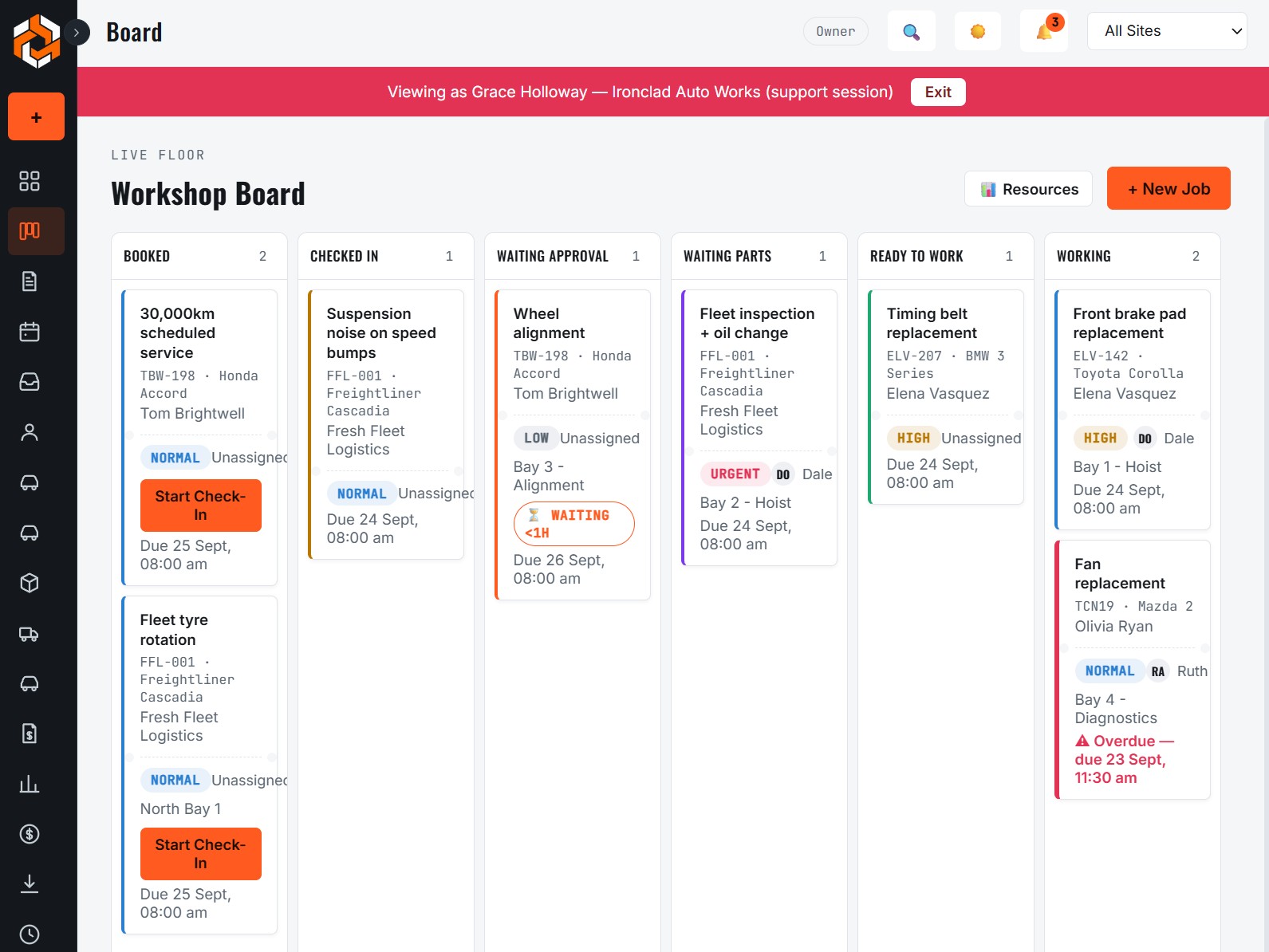
See the whole workshop on one live board
Every job sits on the workshop board from booking through to invoiced, colour-coded by status and priority. Drag a job to another bay or technician and the change shows up straight away for everyone, on the office computer, the front-counter tablet and the phones in the workshop.
Because status lives on the job itself, there is no whiteboard to wipe, no paper job card to lose and no second spreadsheet to keep in step.
Bays, technicians and equipment are checked for you
- Bay assignment: see which bay is free, and what kind of bay it is, before you commit to a time.
- Technician workload: spread the day across the team instead of finding out at 2pm that one person has three jobs stacked up.
- Leave management: know who is actually available when you book.
- Conflict detection: a job that needs a bay, a mechanic or a piece of equipment that is already taken is flagged rather than quietly double-booked.
- Suggested time slots: Mechvy can propose a time that fits the resources a job needs.
Online booking your front desk stays in control of
Customers can request a slot online. The request lands in an approval queue, you check it against the board, and approve it in one click. The customer gets an SMS and an email automatically, including if the time changes later.
How it works day to day
- A booking arrives online or at the counter and becomes a job.
- The advisor drops it onto a bay and technician, with the capacity view showing what is free.
- The mechanic sees it on their phone or tablet, starts the job and updates the status as they go.
- The board stays current, so anyone can answer "where is that car up to?" without walking out to the workshop.
Common questions
Does Mechvy work on a tablet in the workshop?
Yes. Mechvy runs in the browser and is designed to be used on tablets and phones as well as desktop computers, so mechanics can update jobs where they work.
Can I schedule by bay as well as by technician?
Yes. Jobs can be allocated to a bay and a technician, and the calendar and resource view show both so you can see clashes before they happen.
Do customers get reminders and updates?
Customers are notified by SMS and email when a booking is approved or its time changes.
Related
- InspectionsReplace paper inspection sheets. Mechanics mark OK, Attention or Fail on a phone or tablet, add photos, and turn findings into quote lines in one click.
- Quotes & invoicesTurn a job into a quote customers approve online line by line, then a GST-correct tax invoice. Xero and MYOB integration, online payment, quote follow-ups.
See it in your own workshop
Try the live demo, or tell us about your workshop and we will help you get set up.
Talk to us